
How to book a product photo shoot online (the easy way)
Need product photos but don't have time to coordinate with photographers, find a studio, and manage all the logistics? Good news: booking a professional product photo shoot online is easier than you think. Here's everything you need to know.
Why book your product photo shoot online?
Traditional photo shoots require emails, phone calls, studio visits, and endless back-and-forth. Online booking lets you skip all that. You can see pricing upfront, choose exactly what you need, and get on the calendar in minutes, not days or weeks.
This is especially helpful for brands that need consistent content without the hassle of traditional agency relationships.
What to look for in an online photo booking platform
Before you book, make sure the platform offers:
- Transparent pricing - No "contact us for a quote" runaround
- Flexible options - Photos, videos, and different scene choices
- Fast turnaround - You need your content quickly to keep up with demand
- Professional quality - Just because it's easy doesn't mean it should look amateur
- Add-ons you actually need - Models, stylists, prop styling, etc.
How to book a product shoot with soona
Here's the actual step-by-step process for booking a shoot online:
Step 1: Go to book.soona.co
Start at the booking page where you'll see all your options laid out clearly.
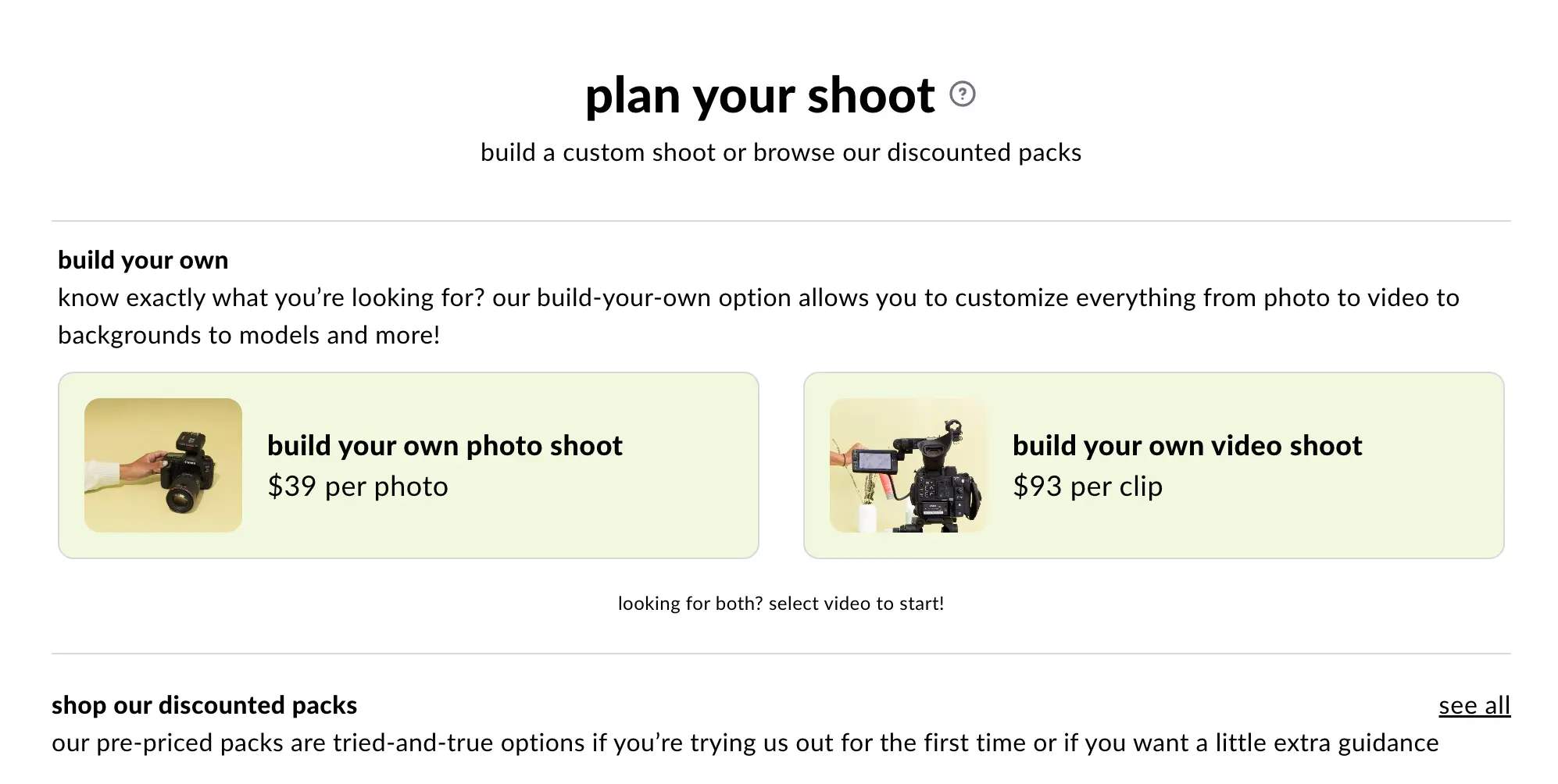
Step 2: Select your content type
Choose between photo, video, or select from one of the templated packs (these are great if you need specific types of content like Amazon listings or social media sets). If you have a large project you can also chat with soona experts.
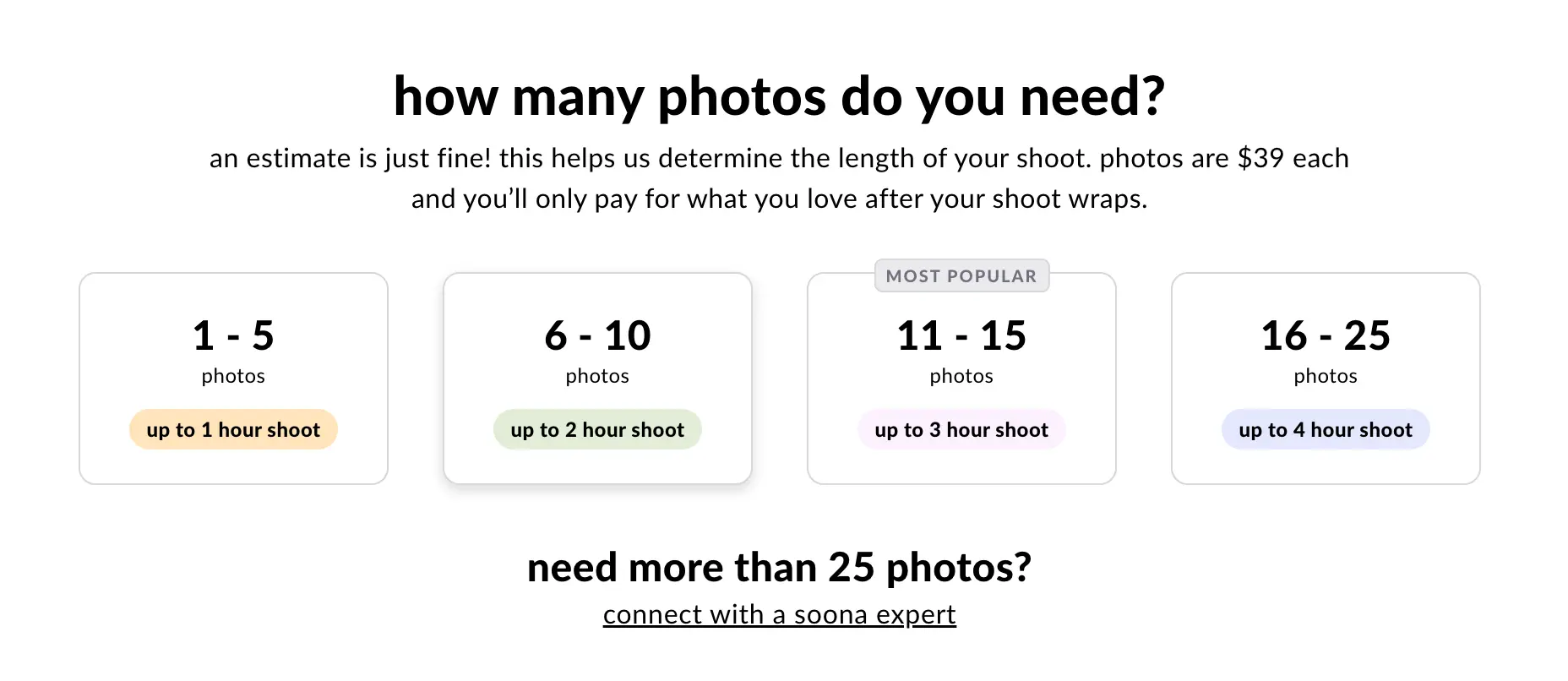
Step 3: Choose your quantity
Select how many photos you need or what type of video you're looking for. This is where you can scale based on your budget and content needs.
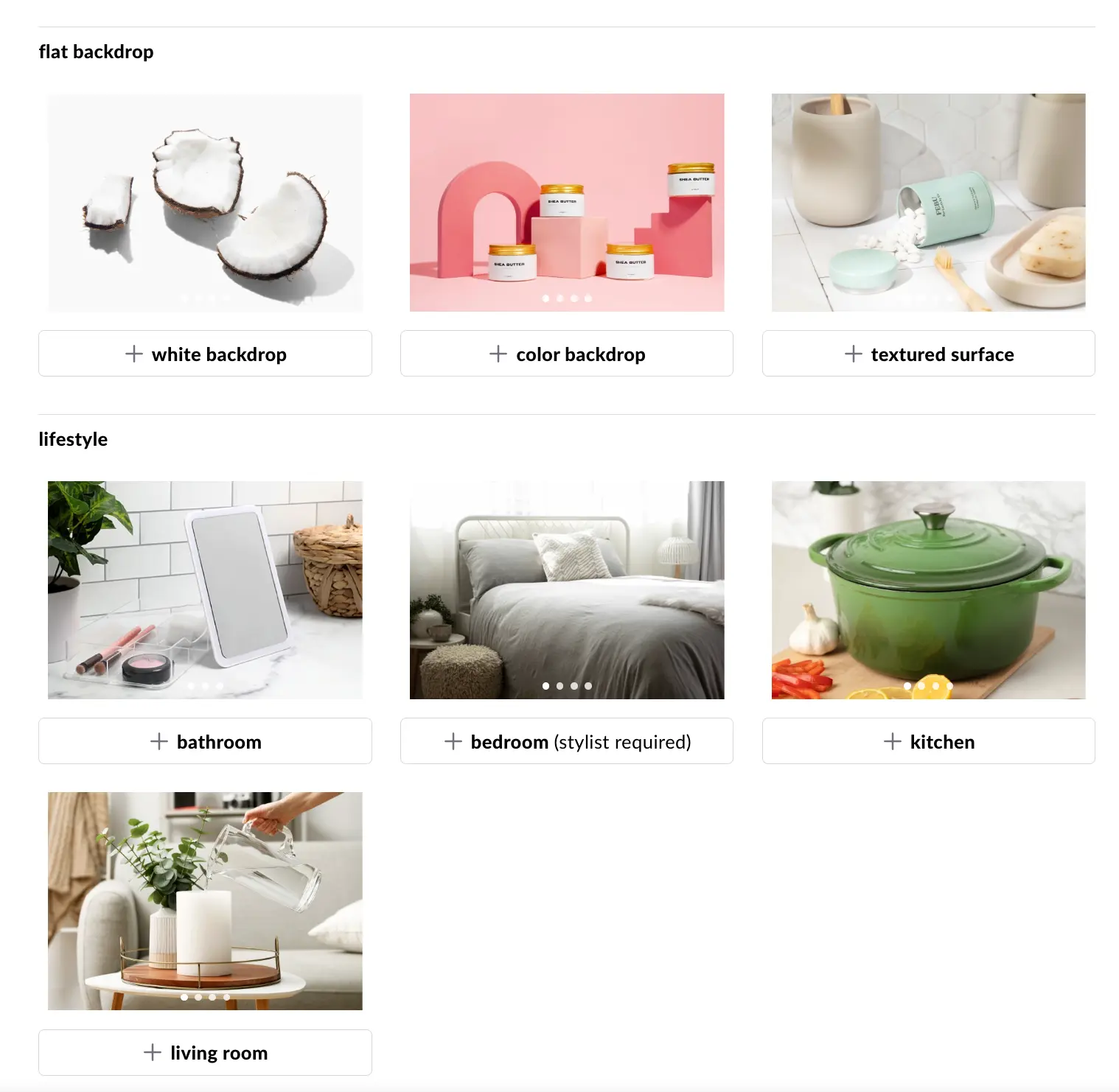
Step 4: Pick your backdrop
This is where it gets fun. You can choose:
- Flat backdrops - Classic white, pastels, bold colors, wood, tile, concrete - perfect for clean product shots
- Lifestyle scenes - Living room, kitchen, bathroom, or bedroom settings that show your product in context
Lifestyle scenes are especially powerful for helping customers visualize your product in their own space.
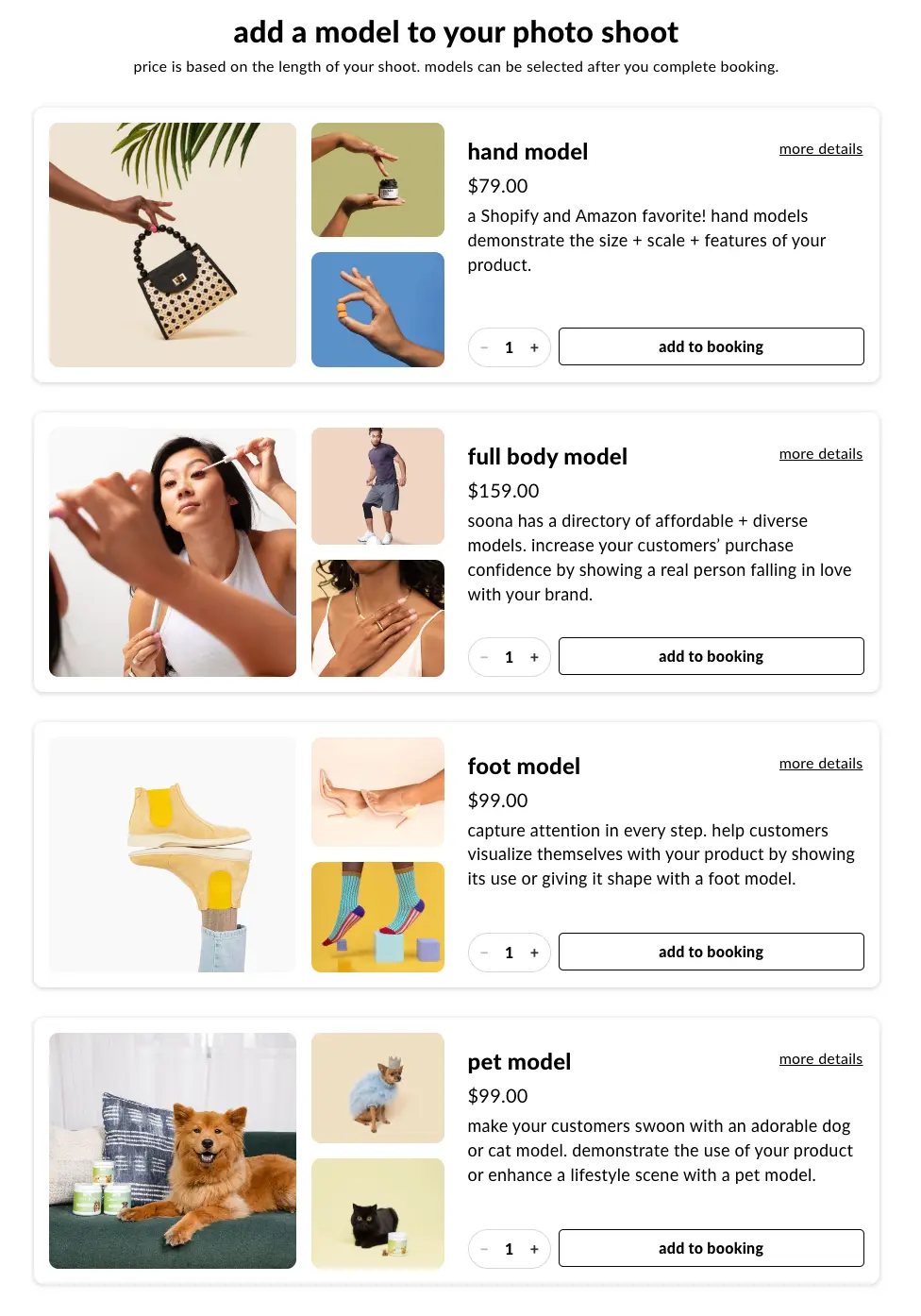
Step 5: Add models to your shoot
Depending on your product, you might want to add models to bring your content to life. soona offers:
- Hand models - Perfect for showing product scale, texture, or how something's held
- Full body models - A must-have for apparel and lifestyle shoots
- Foot models - Ideal for footwear, socks, or floor-level products
- Pet models - Pet brands, and because sometimes your product needs a furry friend
You can add as many models as you need for your shoot. soona offers a diverse pool of models across all ages, genders, and sizes, so you can find the right fit for your brand and audience. No need to worry about usage rights either! soona makes this part super easy.
Step 6: Choose your shoot upgrades
This is where you can take your shoot from good to great:
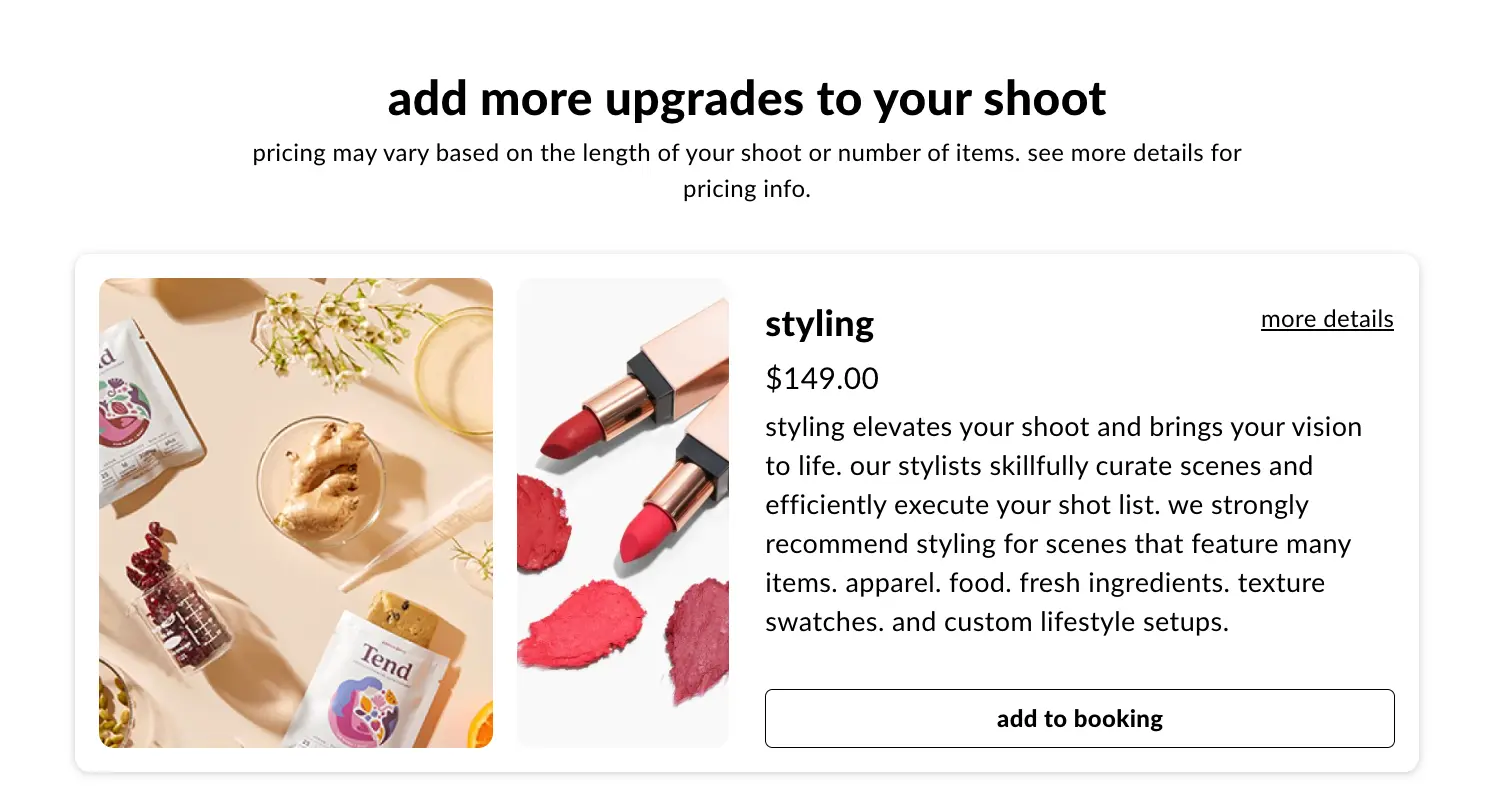
Stylist - Recommended for complex shoots. Stylists really elevate all shoots, but they're especially valuable for apparel, food, and beauty brands. They'll help with composition, arrangement, and making sure every shot looks intentional.
BTS video - Get a behind-the-scenes video for your social channels. Great for showing your process and building brand authenticity.
Grocery shopping - Need fresh ingredients? soona can handle the shopping so your products are shot with exactly what they need.
Mannequin styling - If you're an apparel brand using a ghost mannequin (that invisible model effect), this upgrade ensures your garments are styled perfectly for that clean, professional look.
Hair & makeup - A must if you're using models. This ensures your models look polished and camera-ready, which makes a huge difference in final image quality.
Steaming - Essential for textiles and apparel brands. Wrinkles kill product shots, steaming ensures your fabrics look crisp and professional.
Pro tip: Don't skip the stylist if you're investing in models, hair & makeup, or shooting apparel. They'll make sure all those elements work together seamlessly.
Step 7: Decide whether you want to come to the studio or join remotely
soona has several studio locations so you have the option of being on set physically or virtually! Most people enjoy joining remotely from the comfort of their home or office. Either way, you'll be able to review your photos and videos instantly and give live feedback to the creative crew.
Step 8: Confirm your choices
You can join one of our memberships or pay for a one-time reservation fee to complete your booking.
Step 9: Ship your products
Once you have made your booking you can follow the in-app guide to get ready for the big day! Ship your products, complete your shot list and share your goals with the crew.
Step 10: Sit back and relax
You did the hard part, now it's time to sit back, relax, and pat yourself on the back. soona will schedule your shoot and you'll join in-person or remotely.
Tips for a successful photo shoot
Send your products early - Give yourself buffer time for shipping if you're sending items to a studio, and send extras! Want specific props in your shoot? Send those too!
Be specific about your needs - The more detail you provide upfront, the better your results will be
Reference examples - If you have specific shots in mind, share reference images or a Pinterest board
Think about usage - Consider where you'll use these images (Amazon, social media, website) and book accordingly
Ready to book your first product shoot?
Booking a product photo shoot online doesn't have to be complicated. With the right platform, you can go from idea to finished photos in weeks, not months. soona makes it easy to book exactly what you need, whether that's simple white background shots or a full lifestyle shoot with models and styling.
The entire process takes less than 5 minutes to book, and you'll have professional photos in your hands within 24-72 hours of your shoot.
Start your booking at book.soona.co or chat with our team if you have questions about your specific project.
How to book a product photo shoot online (the easy way)
Need product photos but don't have time to coordinate with photographers, find a studio, and manage all the logistics? Good news: booking a professional product photo shoot online is easier than you think. Here's everything you need to know.
Why book your product photo shoot online?
Traditional photo shoots require emails, phone calls, studio visits, and endless back-and-forth. Online booking lets you skip all that. You can see pricing upfront, choose exactly what you need, and get on the calendar in minutes, not days or weeks.
This is especially helpful for brands that need consistent content without the hassle of traditional agency relationships.
What to look for in an online photo booking platform
Before you book, make sure the platform offers:
- Transparent pricing - No "contact us for a quote" runaround
- Flexible options - Photos, videos, and different scene choices
- Fast turnaround - You need your content quickly to keep up with demand
- Professional quality - Just because it's easy doesn't mean it should look amateur
- Add-ons you actually need - Models, stylists, prop styling, etc.
How to book a product shoot with soona
Here's the actual step-by-step process for booking a shoot online:
Step 1: Go to book.soona.co
Start at the booking page where you'll see all your options laid out clearly.
Step 2: Select your content type
Choose between photo, video, or select from one of the templated packs (these are great if you need specific types of content like Amazon listings or social media sets). If you have a large project you can also chat with soona experts.
Step 3: Choose your quantity
Select how many photos you need or what type of video you're looking for. This is where you can scale based on your budget and content needs.
Step 4: Pick your backdrop
This is where it gets fun. You can choose:
- Flat backdrops - Classic white, pastels, bold colors, wood, tile, concrete - perfect for clean product shots
- Lifestyle scenes - Living room, kitchen, bathroom, or bedroom settings that show your product in context
Lifestyle scenes are especially powerful for helping customers visualize your product in their own space.
Step 5: Add models to your shoot
Depending on your product, you might want to add models to bring your content to life. soona offers:
- Hand models - Perfect for showing product scale, texture, or how something's held
- Full body models - A must-have for apparel and lifestyle shoots
- Foot models - Ideal for footwear, socks, or floor-level products
- Pet models - Pet brands, and because sometimes your product needs a furry friend
You can add as many models as you need for your shoot. soona offers a diverse pool of models across all ages, genders, and sizes, so you can find the right fit for your brand and audience. No need to worry about usage rights either! soona makes this part super easy.
Step 6: Choose your shoot upgrades
This is where you can take your shoot from good to great:
Stylist - Recommended for complex shoots. Stylists really elevate all shoots, but they're especially valuable for apparel, food, and beauty brands. They'll help with composition, arrangement, and making sure every shot looks intentional.
BTS video - Get a behind-the-scenes video for your social channels. Great for showing your process and building brand authenticity.
Grocery shopping - Need fresh ingredients? soona can handle the shopping so your products are shot with exactly what they need.
Mannequin styling - If you're an apparel brand using a ghost mannequin (that invisible model effect), this upgrade ensures your garments are styled perfectly for that clean, professional look.
Hair & makeup - A must if you're using models. This ensures your models look polished and camera-ready, which makes a huge difference in final image quality.
Steaming - Essential for textiles and apparel brands. Wrinkles kill product shots, steaming ensures your fabrics look crisp and professional.
Pro tip: Don't skip the stylist if you're investing in models, hair & makeup, or shooting apparel. They'll make sure all those elements work together seamlessly.
Step 7: Decide whether you want to come to the studio or join remotely
soona has several studio locations so you have the option of being on set physically or virtually! Most people enjoy joining remotely from the comfort of their home or office. Either way, you'll be able to review your photos and videos instantly and give live feedback to the creative crew.
Step 8: Confirm your choices
You can join one of our memberships or pay for a one-time reservation fee to complete your booking.
Step 9: Ship your products
Once you have made your booking you can follow the in-app guide to get ready for the big day! Ship your products, complete your shot list and share your goals with the crew.
Step 10: Sit back and relax
You did the hard part, now it's time to sit back, relax, and pat yourself on the back. soona will schedule your shoot and you'll join in-person or remotely.
Tips for a successful photo shoot
Send your products early - Give yourself buffer time for shipping if you're sending items to a studio, and send extras! Want specific props in your shoot? Send those too!
Be specific about your needs - The more detail you provide upfront, the better your results will be
Reference examples - If you have specific shots in mind, share reference images or a Pinterest board
Think about usage - Consider where you'll use these images (Amazon, social media, website) and book accordingly
Ready to book your first product shoot?
Booking a product photo shoot online doesn't have to be complicated. With the right platform, you can go from idea to finished photos in weeks, not months. soona makes it easy to book exactly what you need, whether that's simple white background shots or a full lifestyle shoot with models and styling.
The entire process takes less than 5 minutes to book, and you'll have professional photos in your hands within 24-72 hours of your shoot.
Start your booking at book.soona.co or chat with our team if you have questions about your specific project.